Accounting>Accounts
The Account Summary is displayed when you click on Accounting>Accounts. This is where you can enter the details about cash transactions in your accounts. You can also access a list of all transactions by account.
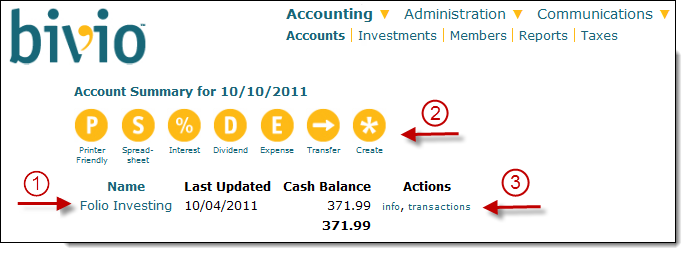
On it you will see:
- A list of all your active financial accounts. You can access a transaction list for any one of them by clicking on its name or the transactions link.
Buttons you can use to access forms to make entries pertaining to the cash in your accounts. For example you can enter a club expense, enter interest or money market dividends and enter transfers of cash between accounts.
There are also buttons you can use to open a printer friendly page to print a list of your accounts and their balances, export your account list to a spreadsheet and create a new account if you change or add a new brokerage or bank account.
- An info link next to each account where you can change any information about the account. For example, you can change its name and specify whether or not your cash is earning tax free interest. You can also Add or Update your AccountSync brokerage login information.
Page Preferences At the bottom of the page, you can change the page settings.

You can adjust the font size and choose whether or not to display inactive accounts. You never want to delete an inactive account. All of your past history is still an important part of your records. But, when an account has not been used for 3 months, it will be considered inactive and will only be displayed if you check this box.
Note: iCLUBcentral(R) Club Accounting creates an "off the books" Petty Cash Account. Users who have imported their club data from the iCLUBcentral(R) Club Accounting will the same account in bivio in a separate section on this page. Transfers to or from an "Off books" account and any regular account are not permitted. For information about how to close out such an account, email us at support@bivio.com