Editing Transactions
Most transactions in bivio can be edited if you need to make a change.
To edit, first open the appropriate transaction list to find it.
Transaction lists are found by going to the Accounting>Accounts , Accounting>Investments or Accounting>Members pages, and clicking on an Account, Investment or Member name.
You'll see an edit link to the right of most transactions on the list.
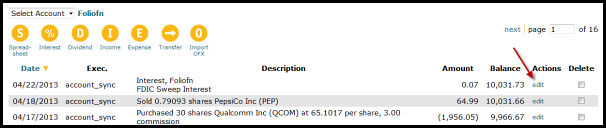
Click on it and the appropriate entry form will open so you can make whatever changes are needed. After you make your changes, make sure you click the OK button at the bottom of the page to enter them.
Notes:
- All transactions that you enter with bivio are editable except member withdrawals, which have to be deleted and reentered.
- Editing a transaction will mean any subsequent transactions will also be updated. You should never enter a withdrawal or file or distribute club taxes until you are sure all your data in bivio is correct.
- Historical transactions are a required part of your clubs history and should never be deleted.
- Some transactions entered into and uploaded with iCLUBcentral(R) Club Accounting data cannot be edited. Such transactions will not have an Edit link next to them and will have to be deleted and reentered.
Related help topics:
- Account Transactions
- Correcting Your Records
- Deleting Transactions
- Investment Transactions
- Member Transactions
More questions? More Help