Accounting>Investments
When you select Accounting>Investments, the Investment Summary page is displayed. It is a starting place for the entry of Investment related transactions.
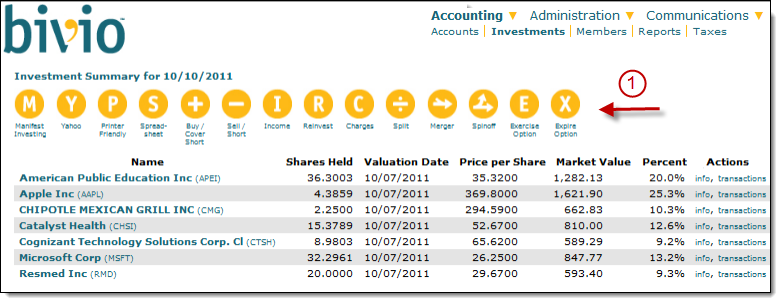
At the top of the list of investments you will see various buttons which will lead you to forms where you can enter transactions related to your investments.
- For example, you can enter a purchase or sale, the receipt of a dividend or other investment related income, a reinvested dividend, any charges you had from a dividend reinvestment program and details of any corporate reorganizations such as splits, mergers or spin-offs. If you subscribe to our ActivePartnership service, you will see the buttons shown here that will allow you to enter options trading details. more info
- If you have a Manifest Investing subscription or would like to start a free trial, you can click on the Manifest button to see your club portfolio displayed in a Manifest dashboard.
- Select the Yahoo button to see your club portfolio as a Yahoo Finance page. From that page you can easily access instant quotes and a variety of other research information about your club stocks.
- If you'd like to export the information into a spreadsheet or a printer friendly page, you'll also see buttons which will allow you to do that.
- If you have any unlisted investments in your portfolio, you'll see a "Value Unlisted" button you can use to update their prices.
The columns of information you'll see displayed in the body of the page are:
Name - The name of the investment or security from the bivio database. The list will include investments held by your club as of today's date. If you check the "Show Inactive Investments" box at the bottom of the page the list will expand to display all securities that have ever been held by your club.
Clicking on a specific security name will open a page showing all the Investment Transactions related to it. Officers will see buttons on that page that will allow them to enter transactions related to the specific investment being viewed.
- Shares Held - The quantity of shares owned by the club as of today's date.
- Valuation Date - The date that the market price was last updated for a security. Market prices are updated automatically for most securities each evening so you should see the previous days date in this column.
Those investments that are not automatically updated by bivio are called Unlisted Investments. It is important that you update their prices manually every time you are making an entry such as a member payment that requires a club valuation. Valuations of Unlisted Investments must be updated manually by an officer of the club.
- Price per Share - The price per share of this security as of the most recent price update.
- Market Value - The most recently updated total value of each of your holdings.
- Percent of Portfolio - This investment as a percentage of the total value of all the investments held by the club. (Not including cash)