Accounting>Members
The Member Summary is displayed when you click on Accounting > Members. The Member Summary is the starting place for the entry of all member related transactions.
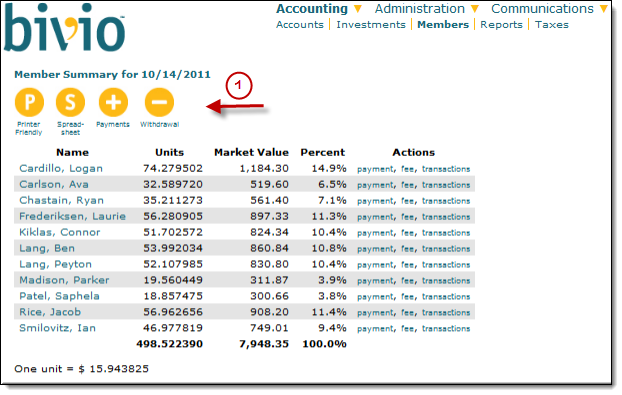
If you are a club officer, at the top of the list of members you'll see various buttons. They will lead you to forms where you can enter transactions related to the member accounts.
- For example, you will select the Payments button to enter member contributions to your club. more information
- If a member withdraws money from your club (full or partial withdrawals), it is important to enter this transaction using the Withdraw button you will see on this page. more information
- If you'd like to export the information into a spreadsheet or a printer friendly page, you'll also see buttons that will allow you to do this.
- The columns of information you'll see displayed in the body of the page shows you information about each members account as of today's date.
Name - The list will include all active members. If you check the "Show Withdrawn Members" box at the bottom of the page, the list will expand to display all members who have ever belonged to your club. It is important to keep this historical information as part of your club records.
Clicking a specific member name will open a page showing all the Member Transactions recorded in each persons account. Officers will see buttons on that page that will allow them to enter transactions related to a specific member.
- Paid - The total amount that has been paid into the club by each member as of a given date. This amount includes payments, fees, and withdrawals. A negative value would indicate that a member has withdrawn more dollars from the club than he/she paid in.
- Units - The number of units of the club owned by the each member as of the date of the report.
- Market Value - The total value of each members account as of the most recent price update. Market value is updated once each day the stock market is open, late in the evening.
- Percent - The value of the account of each member as a percentage of the total value of the club.
- Actions - These are additional links an officer can use to enter individual member payments or fees (penalties) or to open a list of all the transactions that have occurred in a specific members account.