Editing Opening Balances
Edit Opening Balances is a method you can use to switch your accounting to bivio if you do not want to re-enter every one of your historical transactions. It is normally used by clubs which have been in existence for a number of years before coming to bivio and have been using a spreadsheet, manual accounting or an accountant to keep their club records.
Brand new clubs, (those that have started since January 1st of the current year), should not use this method and should enter all Member Transactions, Investment Transactions, and Account Transactions that have happened since they started using the yellow buttons on the Accounting>Accounts, Accounting>Investments or Accounting>Members pages. If you are using an AccountSync broker, you may also be able to automatically transfer any transactions that have occurred during the current year.
Opening balances may be entered into bivio when you first create your club by going to Administration>Tools>Edit Opening Balances. If you do not have all the information you need at first, you can enter some of it and go back later to complete your entries.
Before entering opening balances a switch-over date must be selected. This date is the date used to determine the opening balances amounts you will be entering. For tax reasons, the date should not be later than the start of the current calendar year. Normally a club would choose the first day of the current calendar year.
Entering or editing opening balances is a three step process.
-
Cash Balances As of Switchover Date
On the first opening balance screen you enter the name and cash balance as of your switchover date for each account your club has as of that date. Note that the amount you enter should be the cash balance only. Do not enter the total value of the account including your investments.
If any of your accounts pay tax free interest on your cash balances, identify that by clicking on the Tax Free Interest/Dividend box next to the applicable account.
If the number of data entry fields are insufficient to enter all of your club's active accounts click on Add More Rows to increase the number of data entry fields. When you are done, click on the button labeled Next at the bottom of the screen to move to the next opening balance screen
-
Investment Information As of Switchover Date
On the second opening balance screen you'll enter the opening balances for each lot of each investment your club still owned as of your switchover date. For each lot you'll enter the Ticker, the Acquisition Date, the Adjusted Cost basis and the Number of shares. If an investment and its ticker symbol is not included in the bivio database click on New Unlisted to create new Unlisted Investments.
Important Note: Each block of each investment held by the club as of the switch-over date must be entered individually. Do not combine lots of the same investment into a single entry. When done, click on the button labeled "Next" to move to the final opening balance screen.
You may be able to get the information needed to make these entries from an "Unrealized gain/loss" or "Open Tax Lot" report from your broker that was generated as of your switchover date. You will need a version of the report that shows information for each lot of a stock separately. You should not combine lots to make opening balances information.

- Member Account Balances As of Switchover Date
On the member opening balances screen you have four columns. You enter information only for those members who still belonged to your club as of your switchover date.
- Name - Enter the name of any members who still belonged to your club as of your switchover date.
- Paid - This is the total amount the members have paid into the club since they joined up until your switchover date minus any withdrawals they have taken out prior to that date. It is not the current market value of the members account.
- Earnings Allocated - This is the cumulative total income that was reported to them on the K-1 forms they received for taxes in all the years prior to your switchover date. It will be Capital gains + Dividends - Capital losses - Expenses
When you are done the sum of the entries in the first two columns will be equal to the members "Outside Basis" or "Tax Basis" in the club.
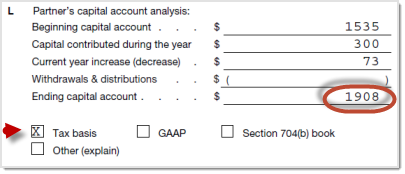
If you have had an accountant doing your taxes in the past, you may be able to find the total in Section L of the most recent years K-1 form for the member. If you know the total only, enter it in the Earnings Allocated column and leave the "Paid in" column blank. If you know the "Paid in" amount, enter it in the Paid in column and subtract that from the total shown on the schedule K-1 and then enter the result in the Earnings allocated column.
- Units - Has your club been using unit based accounting? If so, put the number of units they own as of your switchover date. If not, take the market value of their account as of the switchover date and divide it by 10 and enter that number in the units column.
Entering opening balances can be confusing. Please feel free to contact us in support@bivio.com if you'd like help from one of our Accounting experts to make sure your entries are correct.
Note: When you begin your bivio record keeping with opening balances, your club rate of return information also begins as of your switchover date.